


The Marketplace Match Report: Know What a Supplier Brings Before You Build Anything
Blog
•
4
Mins
Share

The problem: you don't know the data fit until you've already built the pipeline
When you're evaluating a new supplier in the marketplace, it's genuinely hard to know upfront how much their data actually overlaps with yours, or what new data they could add. Historically, the only way to find out was to set up the agreement, build the pipeline, and wait for results to land in your warehouse — by which point you've already committed time and engineering effort to a partnership whose fit you hadn't yet confirmed.
That's backwards. You should be able to see the fit before you build anything.
This is where composable identity changes the equation. Because your identity graph isn't locked inside a black-box resolution engine — it's built from modular, structured identifiers you control — you can bring your data and a supplier's data together on your own terms and immediately see what's actually there. No pipeline required, no waiting on the integration to find out.
That's what a Marketplace Match Report does: it takes your first-party identity data and a supplier's dataset and shows you, in minutes, how much they overlap — and what the supplier could add to your graph that you don't already have.
What a Match Report actually shows you
A Match Report answers two questions at once:
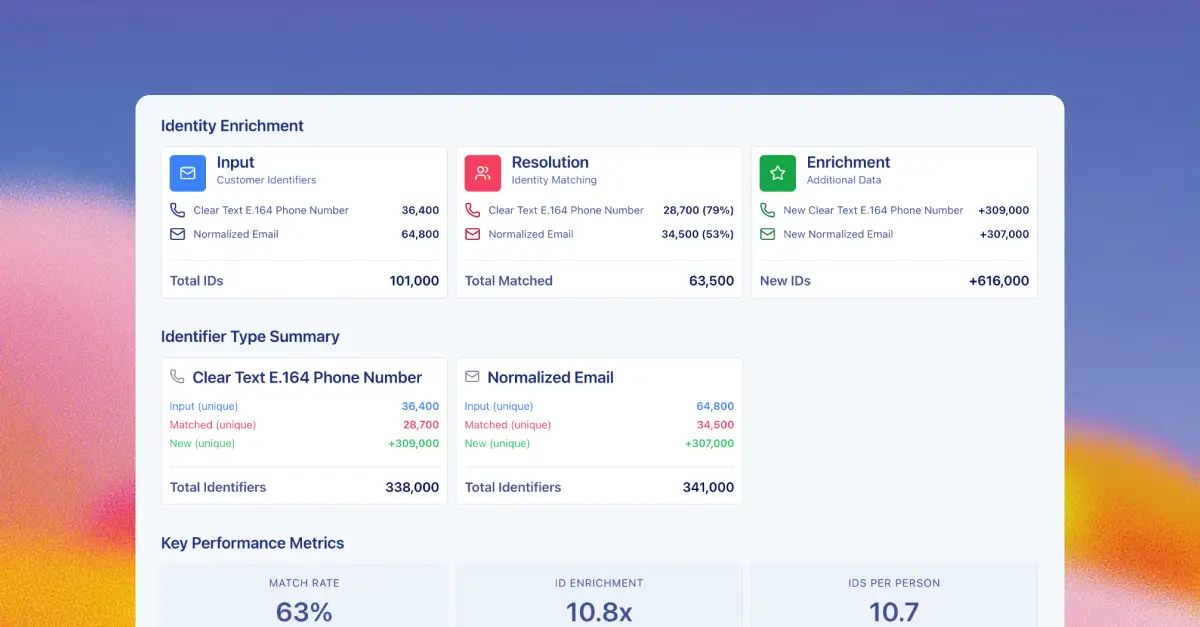
How much of my data does this supplier already recognize? The report resolves your identifiers against theirs and shows a match rate — the share of your people the supplier can identify — broken out by identifier type. It turns "we can identify your customers" from a talking point into a measured number you can see for yourself.
What could this supplier add that I don't have? Beyond the overlap, the report surfaces enrichment — net-new identifiers, and demographic or behavioral attributes, that the supplier contributes for the people you already matched. That's the part that turns a supplier evaluation from a simple yes/no on overlap into a clear picture of what they can add to your data.
Both views come together in three top-line numbers: Match Rate (how much of your data the supplier can identify), ID Enrichment (how many new identifiers they add on top), and IDs Per Person (how many total identifiers you end up with per matched person once the two are combined). No pricing, no commitment — just a clear picture of overlap and value.
To understand how to read and interpret the Marketplace Match Report in depth, dig into the full documentation.
How to run a Match Report
Before running a Match Report, make sure the supplier has set up an Access Rule granting you access to their data, and that you've agreed on which data plane the report will run in. If you're not sure, check with your partner or your Narrative rep to confirm access is configured correctly.
Once that's in place, there are two ways to get a Match Report, depending on how hands-on you want to be.
Option 1: Build it yourself in Graph Studio
If you want full control over exactly what's being matched and enriched, you can build a report yourself. At a high level:
- Pick your data. Choose the dataset with your first-party identity information.
- Pick the supplier. Choose which supplier's data you want to evaluate it against.
- Set your match and enrichment criteria. Choose which identifiers to match on and which supplier attributes you want included in the results.
- Name it and build. Save the report and let it run.
Once it finishes processing, open the report from the Reports list. You'll see your input identifiers, what matched, and what the supplier added — plus three top-line KPIs: Match Rate, ID Enrichment, and IDs Per Person — alongside demographic and behavioral breakdowns for the people you matched.
Option 2: Let Rosetta AI build it for you
If you'd rather skip the configuration entirely, Rosetta AI can do it for you. Just tell it which supplier you want to evaluate — Rosetta AI loads the Match Report skill and handles the setup — matching identifiers, enrichment configuration, and all — then hands you a link straight to the finished report.
It's the lower-lift path: same underlying report, same match rate and enrichment data, without needing to touch Graph Studio directly. Good for a quick gut-check on a supplier before deciding to take a deeper look.
The takeaway
You don't have to guess how well a supplier's data will fit yours. With composable identity, you can put your data and theirs side by side and see the real overlap — and the real enrichment opportunity — in minutes, not months. Whether you build the report yourself in Graph Studio or let Rosetta AI hand you the link, the point is the same: know what you're getting before you build around it.
Book a demo and see how Narrative's composable identity gives you real visibility into every supplier's data — before you build anything.
Explore related
Insights, stories, & resources for the teams building modern data infrastructure.
Blog
•
5
Mins
Map It Once, Use It Everywhere: Attribute Derivations in Rosetta Stone

Blog
•
6
Mins
How to Build an Identity Spine in Snowflake (That You Actually Own)
Blog
•
5
Mins
Identity doomsday: What iOS 27 means for the future of identity