

How to Build an Identity Spine in Snowflake (That You Actually Own)
Blog
•
6
Mins
Share

Snowflake is the ideal home for your identity graph. Your customer data is already there. Connecting it around an ID you control turns separate purchases, logins, and loyalty records into a customer you can recognize across systems.
Think about a customer who buys online, joins your loyalty program in a store, and later signs into your app with a different email. Each interaction adds to the relationship. But if those records remain disconnected, your marketing team might treat a repeat buyer as a new prospect, and your reporting might count one customer as three.
An identity graph connects those records so your teams can work from the same customer history. Building it inside Snowflake puts those connections alongside the data your teams already use for audiences, analytics, and measurement.
Your own customer ID becomes the backbone. You define which signals connect records, bring in providers to fill gaps, and map the resulting profiles to the identifiers each activation platform needs.
Here’s how to build that identity spine in Snowflake, from normalizing your first dataset to activating an audience.
Warehouse-native is not the same as owned
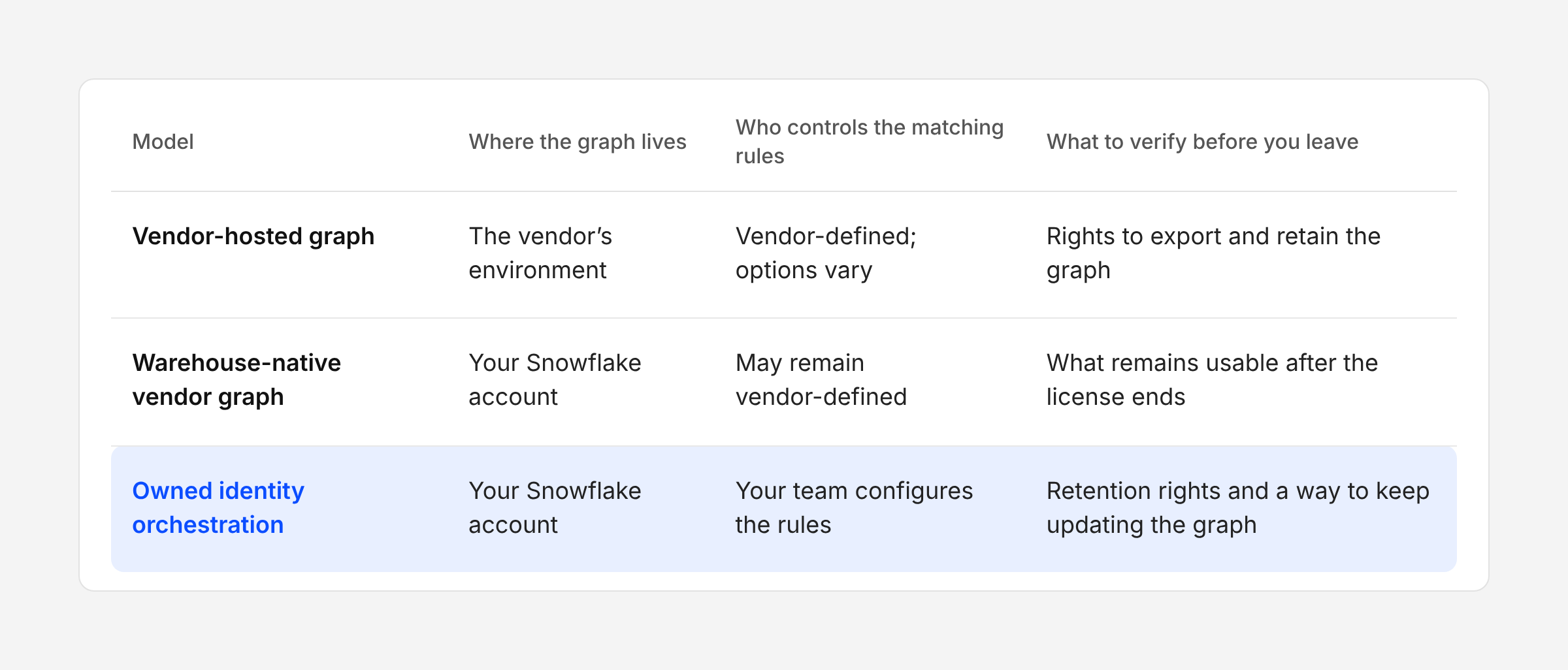
Running in your warehouse tells you where the work happens. Ownership also depends on the rules you control and what you can keep using when the contract ends.
So apply the same test to every setup, including Narrative: can you retain, use, and continue updating the graph when the vendor relationship ends?
Step 1: Normalize before you resolve anything
Your CRM calls it first_name. The loyalty system calls it fname. A partner file dumps it in data_1. The same phone shows up as (570) 555-1234 in one table and +15705551234 in another. Without normalization, equivalent values can fail to match.
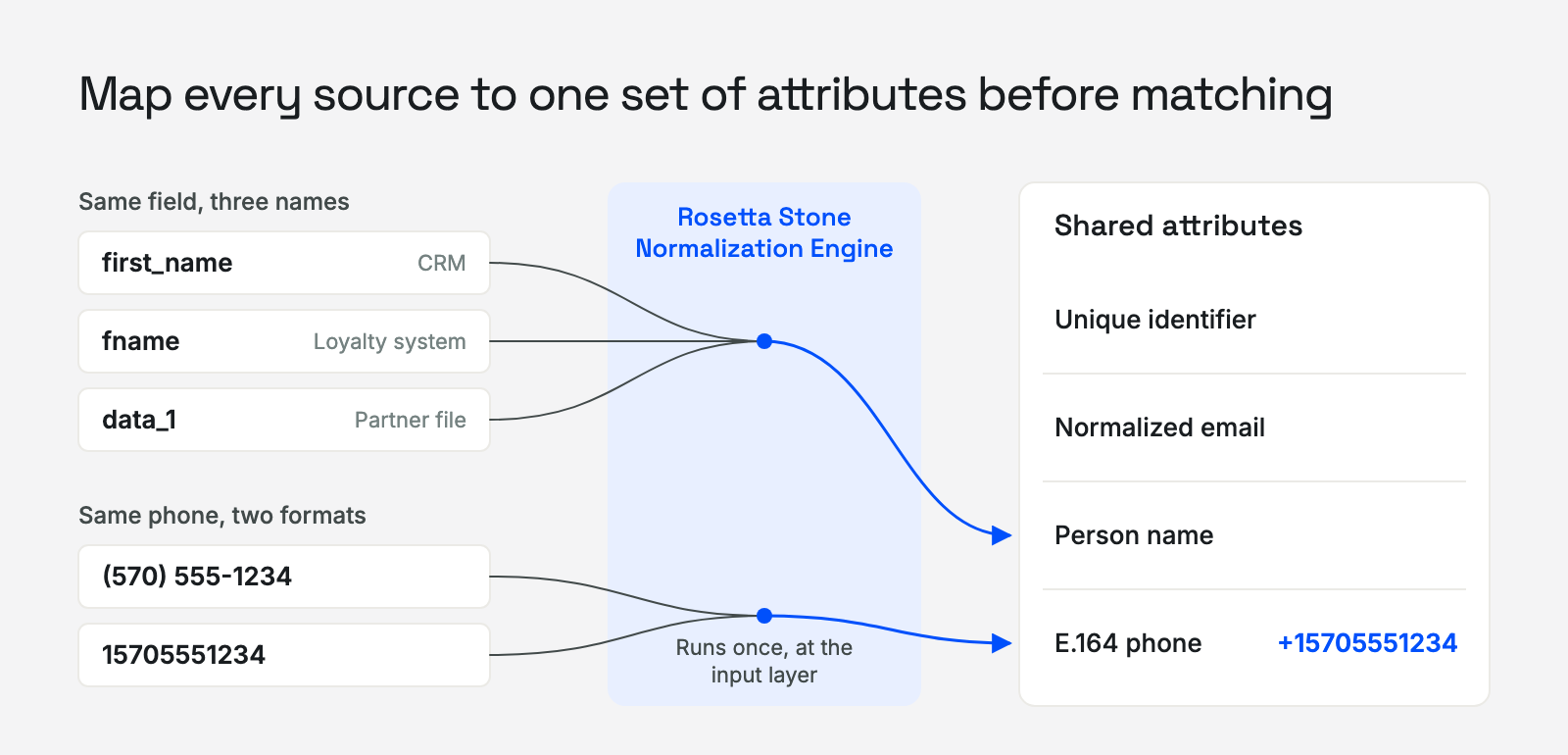
So map every source to shared attributes (unique identifier, normalized email, E.164 phone, person name) once, at the input layer. Narrative's Rosetta Stone Normalization Engine does this before data reaches the graph, so each new provider becomes one more mapping instead of one more integration project.
Composability is a normalization problem before it’s an identity problem.
Step 2: Make your own ID the backbone
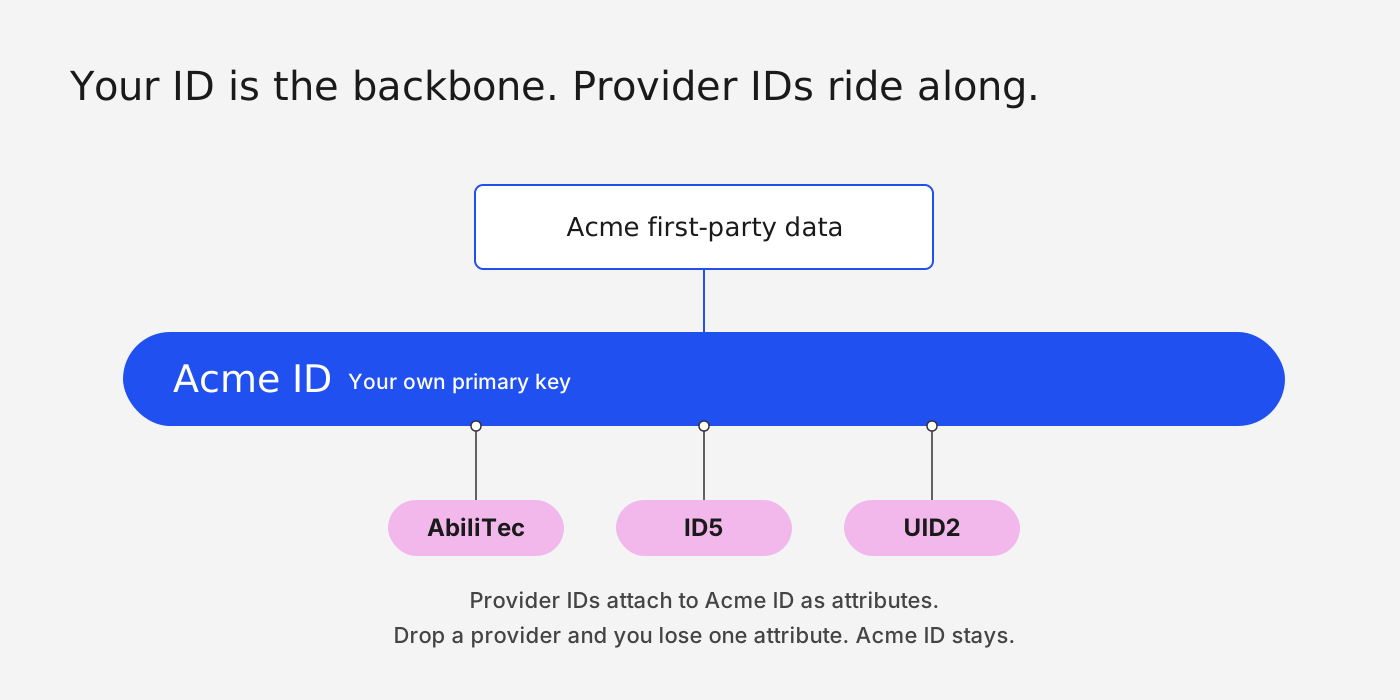
Use a customer ID you control as the backbone of the spine.
If you’re Acme, the backbone is an Acme ID next to your first-party data. CRM records, loyalty accounts, and supported provider IDs all map to it. Some providers, such as LiveRamp, require their IDs to be stored separately rather than keyed to your customer ID. That gives your business a consistent way to recognize a customer across systems.
Keep that ID stable as records change, and preserve the history when profiles merge or split. Track where provider-supplied links came from so you can see what replacing a provider would affect.
Step 3: Run the graph where your data lives
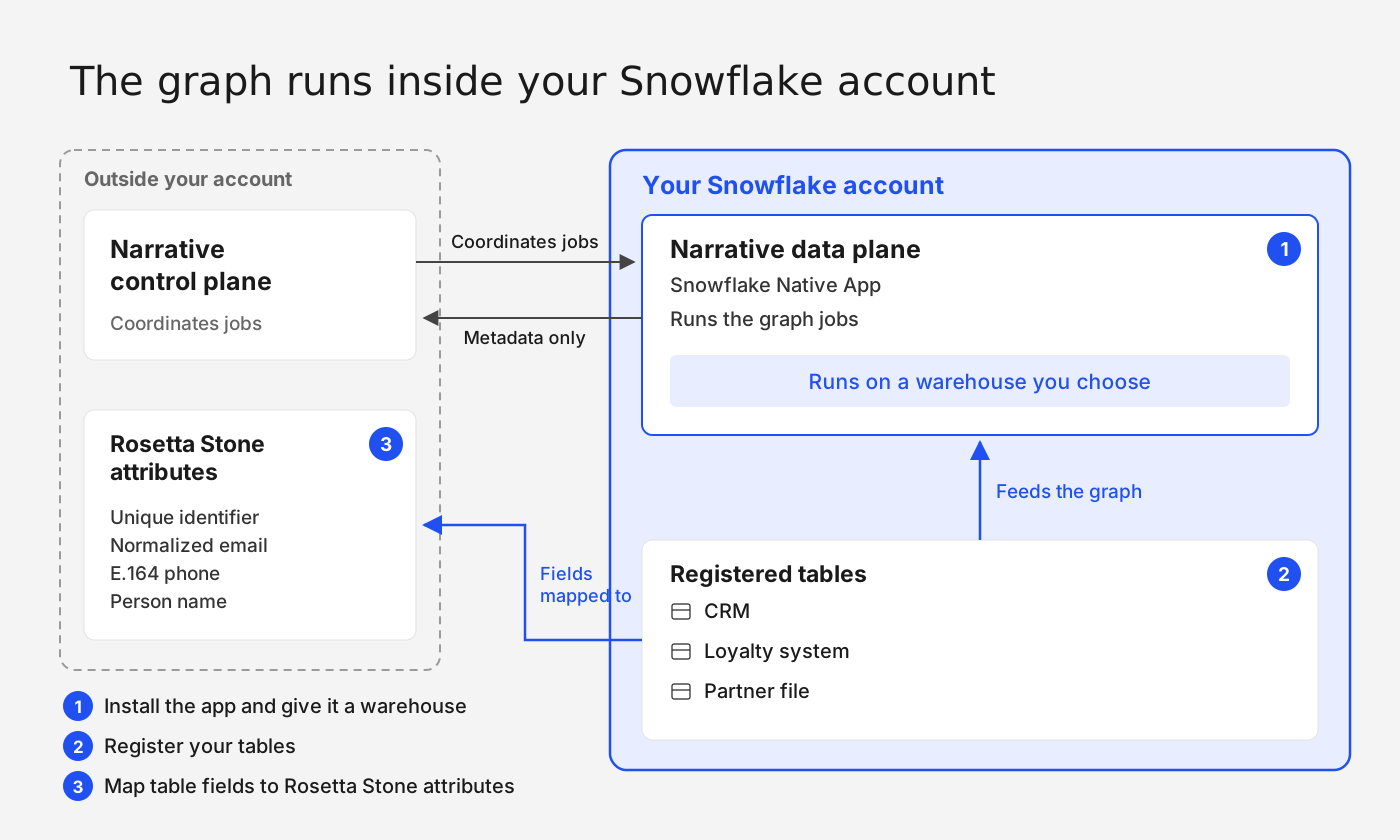
Narrative’s Snowflake Native App runs the graph inside your account. Connect your warehouse, register the tables you want to resolve, and map their fields to Rosetta Stone attributes. The installation guide covers permissions and setup.
Narrative’s control plane coordinates the jobs. Your Snowflake account executes them. Processing stays in your account, with specific exceptions: requested data previews can send sample rows to Narrative, and activation exports send selected data to destinations.
Step 4: Build the edges, then resolve
Start by defining which shared identifiers are enough to connect two records.
Build the connections. In Graph Studio, you might match on email, or on phone plus first name. The second rule requires both values to agree; either rule can create a link.
Then follow the links. Take six CRM records where Michael Scott appears three times. Record 1 shares an email with record 6. Record 6 shares a phone and first name with record 4. Following that chain brings the three records together, even though no pair shares both an email and a phone. Six records resolve into four identities.
.png)
Add guardrails. A shared corporate email can connect people who should stay separate. Limit how many records can merge, exclude overly connected identifiers, and check the results against known customers.
Michael’s three records can now map to one customer ID, such as ACME-001. His activity across those records belongs to one profile.
A CTV media company and a DTC brand may need different matching signals. Graph Studio lets each configure the rules around its use case.
Step 5: Plug providers in as inputs, not as the graph
Your first-party graph only sees your own touchpoints. Providers fill the gaps, but in an owned spine they feed the graph instead of being it.
Baseline first: measure how many records remain unlinked, how large the resolved profiles are, and how accurately they match. Track destination match rates separately. Then decide the job:
1. Graph enrichment: Adds edges, so fragmented profiles merge.
Use it when: The same customer shows up as several profiles
2. Addressability expansion: Appends identifiers to existing profiles.
Use it when: Resolution is sound but platform match rates are low
Measure what each provider adds. Test incremental coverage and match quality against the same first-party dataset. Check for overlap and incorrect merges as well as new matches. Graph enrichment changes the connections between records, so a higher match rate alone is not enough. Evaluating Identity Data Providers walks through how to run that test.
Track the source of each added link. Removing a provider may affect how profiles resolve as well as where you can activate them. Check those dependencies and retention rights before switching, and ask how overlapping matches are billed.
Step 6: Activate off the spine
Build audiences against your customer ID, then map members to the identifiers each destination accepts. Walled gardens typically match on hashed emails and phone numbers, while many DSPs take mobile ad IDs or UID2. Define governance at the identity layer and enforce it across each destination. That way, a consent change or suppression rule is set once on the customer ID and applies wherever the audience goes.
For a recent-purchaser audience, Michael’s activity across all three CRM records rolls up to ACME-001. Apply consent and destination requirements, then send the accepted identifiers. The audience stays anchored to your customer ID as you activate it in different places.
At Advertising Week, Jenny Yurko of Warner Bros. Discovery described the operational benefit: access to a hundred connections through composable infrastructure, compared with spending a year building one. Read her account in the panel recap.
Step 7: Pressure-test the year-three question
Evaluate match quality alongside control, portability, and cost:
- What happens when you leave? Can you retain and use your IDs, resolved links, match history, and audiences? Get the exit terms in writing.
- Can you tune the logic and take the rules with you? Establish what you can export and what still depends on licensed software.
- Where can rows leave the account? Check sample previews, API results, activation exports, and cross-cloud workflows.
- How is pricing counted? Ask whether charges accumulate across providers, refreshes, and repeated resolutions of the same person.
- Who has an incentive to favor someone else? And what structurally stops them?
Apply the same test to Narrative. Its portability claim should translate into a documented way to retain your graph and keep updating it after migration. Keeping the output and continuing to run the matching process are separate requirements.
Test one use case before expanding, including what happens when you change providers. Narrative’s free 19-section RFI template helps you evaluate ownership, architecture, and exit terms alongside match quality.
The next acquisition is already coming
A provider can change ownership, pricing, or access terms. Keep the inputs that work for your business, with a clear path to replace them when they don’t.
An owned spine lets you change providers while preserving continuity around your own customer IDs.
See how Identity Orchestrator runs inside your Snowflake account →
Explore related
Insights, stories, & resources for the teams building modern data infrastructure.
Blog
•
5
Mins
Identity doomsday: What iOS 27 means for the future of identity
Blog
•
5
Mins
From Forecast to Audience: What a Composable Stack Looks Like