



Rosetta AI Chat, Rebuilt on MCP
Last month we shipped a remote MCP server for Narrative. Connect Claude Code, Claude Desktop, Cursor, or any MCP-aware client, and you get the full Narrative platform — dataset lookups, NQL execution, access rules, the Knowledge Base — all from a single conversation in whatever harness your team already uses.
That's one path. This is the other one.
Rosetta AI Chat is Narrative's own harness, and it just got rebuilt from the ground up, on the same MCP servers powering your external agents.
One platform, two ways to get there
If your team uses Claude Code or Cursor, connect it to the Narrative MCP servers and you're in. Every tool, skill, and capability available to external agents is available there.
But not every team has an agent harness set up. Not every company will let one be set up. And even the teams that do have one will hit cases where a browser-based, account-aware interface is the faster path: sharing a result with someone who doesn't have Claude Desktop, pulling up a chart without leaving the platform, or working inside an environment where IT policy says you use the vendor's UI.
Rosetta AI Chat is built for those cases. It runs on the exact same MCP servers so there is no capability gap. What external agents see, Rosetta sees. Every new tool, skill, and fix that ships to the MCP servers shows up in Rosetta automatically, with no separate "chat backend" to keep in sync.
The difference is what Rosetta does on top: richer rendering, tighter integration with your Narrative account, and a chat surface designed specifically for the kind of work Narrative is for.
Watch it work, step by step
Most AI chat interfaces are black boxes. You send a request, something happens, you get an answer.
Rosetta now shows you the work — at two levels.
Before execution begins, Rosetta's plan surfaces as a compact tab pinned to the top of the message bar: click it to expand a checklist of every step the agent has planned, which one it's on, and which are done. You know what's coming before it happens.
As it runs, tool calls render in real time from the live messages: chained dataset lookups, NQL refinements, Knowledge Base searches. Related steps are grouped into round summaries, so a complex investigation reads as one coherent unit instead of a wall of individual tool invocations.
When something takes time, you see what's happening. When something goes wrong, you see where.
@mention your datasets, attributes, and queries
Every data workflow has a cast of characters: specific datasets, attributes, NQL queries, skills. The new message bar supports typed constructs for all of them.
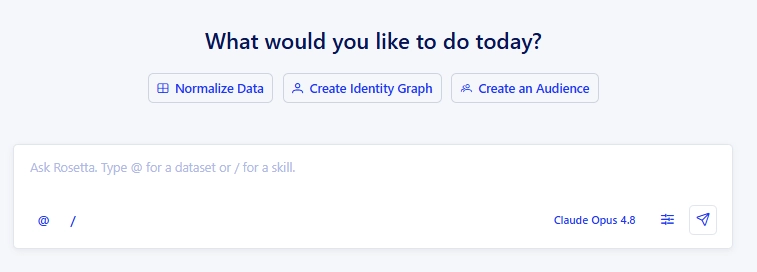
Press @ and a virtualized, filterable picker surfaces the datasets and attributes in your account. Press / — or click the / button in the toolbar — and a searchable skill picker opens, with each row showing the skill's icon, title, and description. Both types render as inline chips in your message and the transcript; hover one for a details popover so you and the agent both know exactly which object you meant.
No copy-pasting IDs. No “the dataset I was looking at earlier.” Just reference it directly, the same way you’d tag a teammate in Slack.
New conversations surface quick-action prompts that seed the message bar with a real skill command — /generate-rosetta-stone-mappings, /generate-identity-graph, /create-lookalike — so a single click drops you straight into a skill's argument flow.
An Artifacts sidebar for everything Rosetta produces
In most chat interfaces, your outputs are your transcript. Find the table, the chart, the query buried somewhere in the conversation history.
Rosetta now splits them out. Charts, tables, datasets, attributes, and other produced objects go into a dedicated Artifacts sidebar — oldest first — so you can scan everything Rosetta produced in a session without scrolling back through the chat. References stay inline where they were introduced. The heavier outputs collect in the drawer.
Your work is findable. Sessions resume on page refresh. In-flight responses aren't cancelled by navigation. The experience is built to hold up across a real working session, not just a single exchange.
Available now
Rosetta AI Chat is live and promoted to top-level navigation — no longer buried under Tools. If you're already in Narrative, you'll find it in the sidebar.
If you're connecting your own agent harness to the Narrative MCP servers, that's available too. Both paths go through the same infrastructure. Pick whichever fits your workflow.
Explore related
Insights, stories, & resources for the teams building modern data infrastructure.
Blog
•
5
Mins
Identity doomsday: What iOS 27 means for the future of identity
Blog
•
5
Mins
From Forecast to Audience: What a Composable Stack Looks Like